

Note 29 · iOS subscriptions
Apple multiseat subscriptions: one buyer, many users
One little purchase. A place for everyone.
Review the plan’s availability, assigned-user access and per-seat economics. Measure purchased seats, assignments and useful activity separately. A larger purchase does not establish adoption or renewal intent.
The person paying may never open your app.
Imagine an iPhone field-notes app that a manager wants to buy for a whole crew. Individual subscriptions make that a collection of separate purchasing decisions. A seat-based plan lets the buyer fund access for other people. The product still has to earn a place in each person’s working day.
On 22 October 2026, Apple launched volume purchasing for auto-renewable subscriptions through Apple Business and Apple School Manager. Organizations buy seats in one purchase and assign them through their device-management tools. For a small iOS studio with a useful work or learning app, this creates another route to a paying customer.
Keep the rollout dates separate: Apple’s current announcement says consumer group purchases can be configured and tested in a Sandbox Apple Account starting in November 2026; their App Store launch is planned for winter. It gives no exact day for either. Plan the organization rollout separately from the consumer-group test. This is a documentation review, not a hands-on integration test or evidence of extra sales.
Correction · 24 October 2026: an earlier version of this note listed 28 October for group Sandbox testing. We have corrected that to November 2026 after checking Apple’s current announcement. The business and school launch remains 22 October.
Start with the subscription you already sell.
Apple’s WWDC26 session requires StoreKit 2 and explains that the existing subscription price applies per seat by default. Buying several seats does not turn an individual price into an unlimited company plan.
The purchase-options documentation says multiseat purchasing is generally enabled by default. It notes exceptions for subscriptions created before 14 September 2026 that do not use StoreKit 2 or have Family Sharing enabled. Inspect each subscription’s Purchase Options and selected sales channels; do not infer its actual setting from the general announcement.
Our suggested first review is small: choose one plan, record its current availability and check what access a separately assigned user should receive. Verify that person can reach the paid task without being asked to purchase again. Check removal and reassignment behavior against your supported client and backend integration before promising a rollout.
Changing availability deserves care. Apple distinguishes disabling multiseat sales from removing a business or school channel: the former leaves existing subscriptions renewing but prevents new seats; the latter ends automatic renewal for affected subscriptions at their next renewal. Read the current settings and customer impact before saving changes.
Look at which seats get the discount.
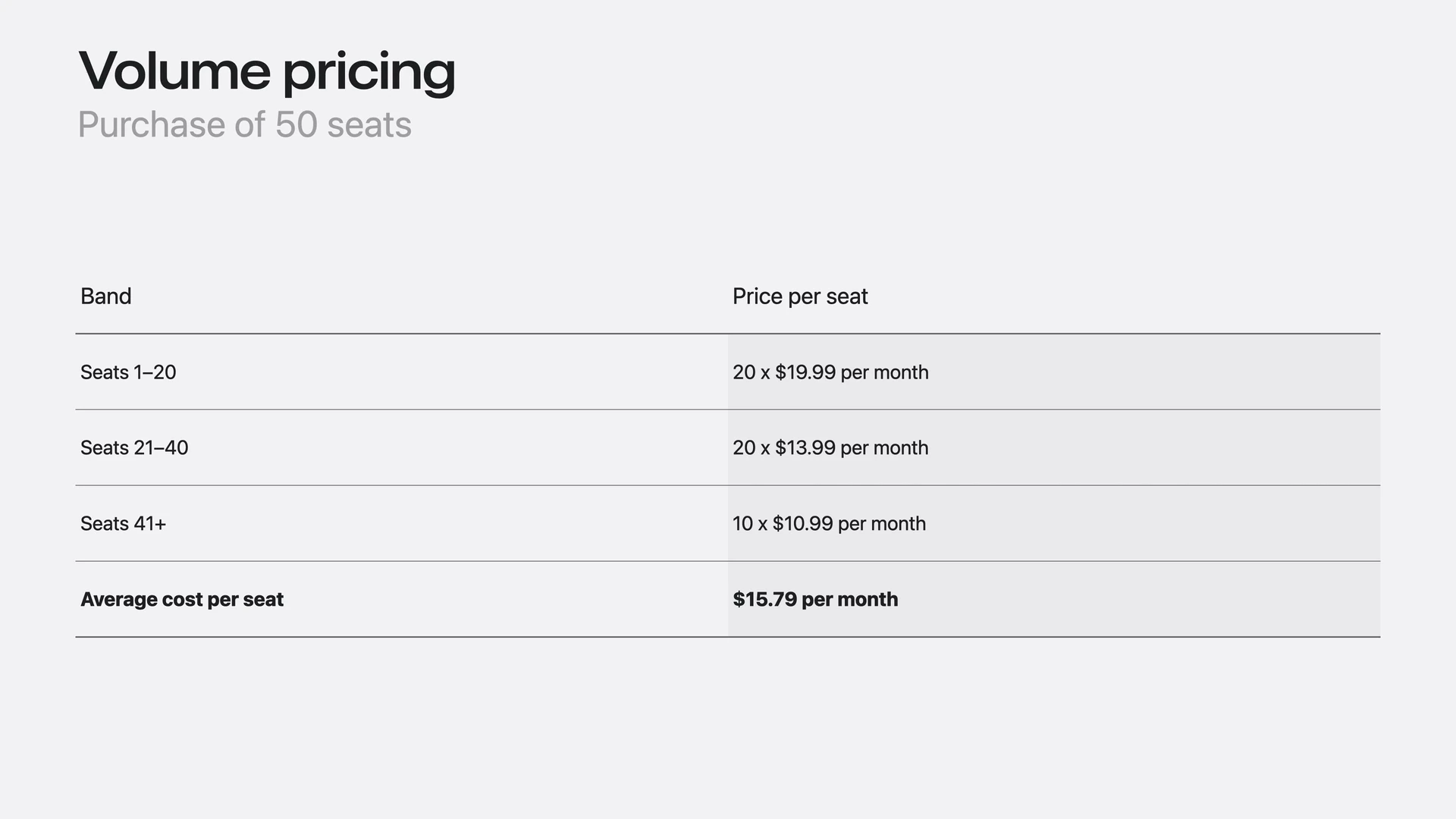
Apple’s own worked example makes the pricing mechanism easier to see. These are illustrative prices from a WWDC26 presentation, not recommended rates or a customer result.
Fifty seats, three price bands.
 Open full image
 The example charges for 20 seats at $19.99 + 20 at $13.99 + 10 at $10.99 per month. Our arithmetic gives $789.50 monthly total, or $15.79 per seat. Only the seats within each band receive that band’s price; all fifty are not repriced at $10.99.
For your app, model service costs before offering a discount. AI generation, storage and support may increase as more people use their seats. Use expected net proceeds after applicable deductions, then subtract attributable usage and support costs. Keep that contribution separate from fixed overhead and sales work; our LTV guide explains the cost basis.
A sold seat needs a useful first day.
Hypothetical iOS pilot: a field-notes team works with one organization already using compatible device management. Agree on one paid task—completing and exporting a site report—and a 30-day observation window. Ask the buyer how seats will be assigned and ask the crew what they need to finish that report.
Track purchased seats, assigned seats and people completing that task separately. If ten seats are bought, eight assigned and five people finish a report, report both 5/8 assigned users and 5/10 purchased seats. These invented counts describe adoption; neither is subscription conversion or proof of retention.
Then follow repeat task completion, support time and net proceeds over the same window. If people stall before their first useful report, improve that handoff before adding more plans. A buyer’s willingness to pay and a user’s reason to return are two different things to learn.
Sources & further reading
- Apple Developer — published 22 October 2026, checked 24 October: group Sandbox testing starts in November; App Store group launch planned for winter
- Apple — subscription purchase options and changes affecting existing subscribers, accessed 24 October 2026
- Apple — WWDC26 session on subscriptions for groups and organizations; historical presentation and illustrative prices
Examples are hypothetical unless explicitly attributed to a real product. Hypothetical examples illustrate the method and do not represent Piiko results or industry benchmarks.