

Note 35 · iOS product decisions
A new feature can change your App Store age rating
A little feature. A bigger audience decision.

Review the behavior behind a feature while its scope is still a choice. Keep audience assumptions in the product brief, inspect regional rating results, and make the declaration match the app people can actually use.
A small feature can change who the app is for.
Hypothetical product decision: a running app adds live location sharing so friends can meet along a route. The team sees a useful social feature. Before committing to the launch, it also needs to understand what that feature means for its App Store age rating.
Apple announced two upcoming content descriptors on 2 November 2026: Shared Location, for real-world location shared with another person or group, and Dating and Relationships, covering connections between real people or virtual companions engaging users in romantic or sexual content. The latter brings a minimum 18+ rating; location sharing’s effect varies by region.
Our product takeaway: review the behavior you are adding while the feature is still a choice. An audience assumption belongs in the product brief, alongside the user problem and the reason to build.
The January deadline is not the first release checkpoint.
Review the feature. Update the declaration.
- Announcement
Inventory the relevant features now.
- New questions
Declarations accompany app updates or questionnaire changes.
- All apps complete
Complete the declarations even without a planned update.
For a small studio, this means assigning an owner before the next submission rather than relying on a distant calendar reminder. Review the shipping build and the planned update separately; a new feature may change an answer that was previously accurate.
Reviewed on 3 November, before the announced rollout. The timeline describes Apple’s announcement; the documentation example below illustrates the existing regional-results view.
Read the regional result, not just the familiar badge.
Apple specifies A16 in Brazil for Shared Location and A18 for Dating and Relationships. A potentially qualifying app, such as parent–child location sharing, can seek an official lower rating from Brazil’s MJSP; that outcome is not automatic. Apple says the official rating appears after verification.
One app. Separate regional results.
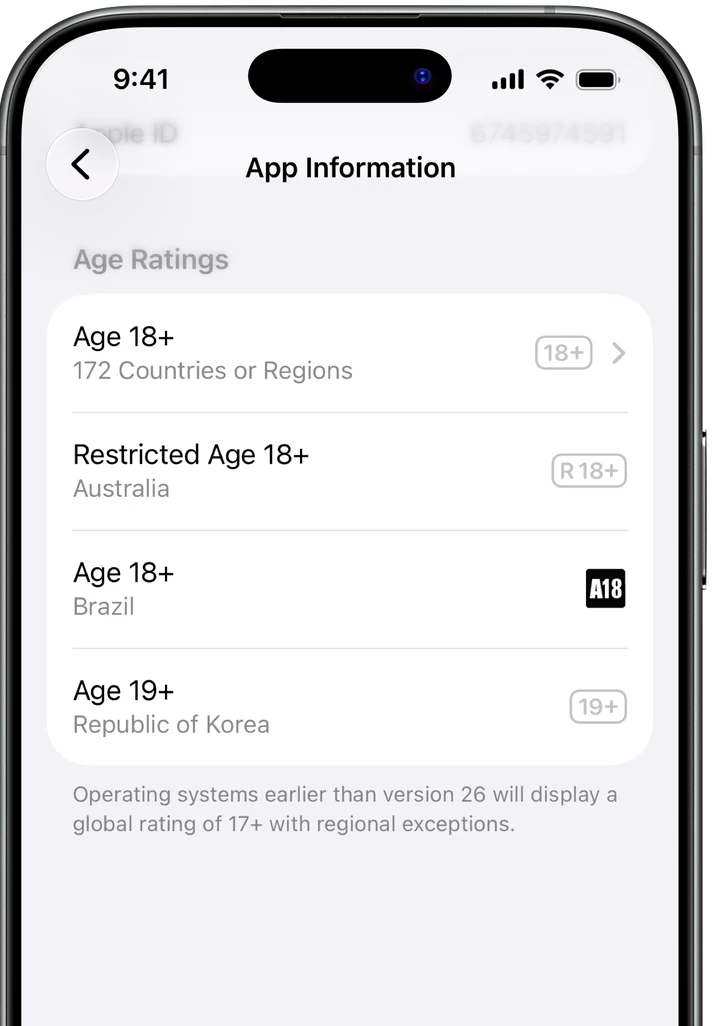

Notice the separate rows. Apple’s published example displays 18+ for 172 countries or regions, R18+ for Australia, A18 for Brazil and 19+ for Korea. It also notes a 17+ global rating with regional exceptions on systems earlier than version 26. These are illustration values, not ratings for your app or a preview of the new questions.
Apple’s setup guide explains that questionnaire answers produce global and regional results, and that ratings can vary with OS version. Its Brazil reference also distinguishes self-rated pictograms from officially issued ratings. Inspect the relevant region’s result instead of assuming one number answers every distribution question.
Write the user action before choosing the descriptor.
Original review exercise: give each planned feature one sentence describing what a person can actually do. For the running app, “find nearby routes on my phone” and “send my live position to a group” are different behaviors. Ask who receives the location; a map icon alone does not answer that question.
For an AI character, describe the interaction it supports. A vocabulary tutor and a romantic companion may share a chat interface while serving different purposes. Read the announced definition against the actual conversation experience; do not classify every AI character as dating, or assume the label “assistant” settles the question.
Keep a short evidence note for the person completing the questionnaire: the relevant screen, the behavior it enables, the intended audience and any unresolved classification question. Use Apple’s definitions and support to resolve ambiguous cases. These examples are prompts for review, not official rating decisions.
If the resulting audience no longer fits the product, revisit the feature’s scope before launch. Reflect the real app in the declaration. Changing the description while retaining the same behavior does not resolve the product decision.
Sources & further reading
- Apple — upcoming content descriptors, announced 2 November 2026
- Apple — set an app age rating, reviewed 3 November 2026
- Apple — age-rating values, regional definitions and Brazil pictograms
Examples are hypothetical unless explicitly attributed to a real product. Hypothetical examples illustrate the method and do not represent Piiko results or industry benchmarks.